|
|
TV and Multimedia Display Technology Shoot-Outs
In-Depth Testing, Measurements and Analysis of OLED, LCD, Plasma, DLP, and LCoS Display Technologies
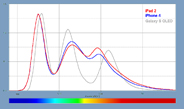
Display Spectra
|  |
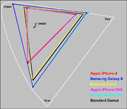
Color Gamuts
| |
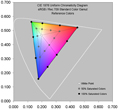
Color Accuracy
| |
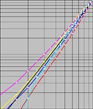
Intensity Scales
| |
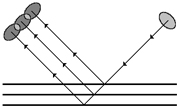
Display Reflectance
|
|
Written for Consumers and Reviewers,
this set of public articles provides expert in-depth display tests,
measurements, comparisons, evaluations, and analysis
of OLED, LCD, Plasma, DLP, and LCoS display technologies
for TV and Multimedia displays,
including computer and video monitors and projectors
where picture quality and color and gray-scale accuracy are important.
They are based on in-depth laboratory measurements with advanced
scientific data analysis using
proprietary diagnostic Test Patterns in our
DisplayMate Multimedia Editions
with proprietary instrumentation in our world-class DisplayMate Test Lab.
The articles are written by DisplayMate Technologies President,
Dr. Raymond Soneira.
They have been published in dozens of Consumer, Video,
Computer, Professional Audio-Video, and Research publications worldwide,
with an extensive readership that ranges between 300,000 and 1.2 million
readers for each article.
Advanced Display Testing and Optimization for Display and Device Manufacturers
DisplayMate Technologies
specializes in advanced display Lab testing
with our proprietary instrumentation and
sophisticated scientific and mathematical display analysis
for state-of-the-art strategic comparisons and
display performance optimizations in our world-class DisplayMate Test Lab.
These public articles are a lite introductory analysis for general consumer audiences.
For Manufacturers we provide very technically advanced display testing,
objective comparisons with competing products,
and our expert analysis and recommendations for improving and optimizing
prototype and production display performance
on a confidential NDA basis for manufacturers for
product engineering and marketing.
If you are a display or product manufacturer and want to
improve display performance to out-perform your competition then
Contact DisplayMate Technologies.
|

Display News
 Display Technology Updates and News Commentary and Analysis

DisplayMate Technologies President Dr. Raymond Soneira
covers short but interesting and timely topics and issues
in Display Technology together with unique commentary and analysis.
Supplements our comprehensive Display Technology article series.
Mobile Displays and Display Technologies Article Series
Our in-depth article series on mobile LCD and OLED Displays and
Display Technologies with Shoot-Outs for Tablets, Smartphones, Smart Watches
and High Ambinet Light displays.
Follow DisplayMate on Twitter for our Latest Results and Announcements
Follow DisplayMate on Twitter for the latest Display News, Display Shoot-Outs,
articles and developments for displays and display technologies in
LCD and OLED Smartphones, Tablets, Smart Watches, Curved and Flexible Displays,
Automobile Displays, TVs, Computer and Video Monitors, Projectors,
and Multimedia displays.
Innovative Displays and Display Technologies Smartphones - Tablets - TVs - Wearable Displays
In this article we cover the major innovative display and display technology
developments, predictions, and trends that you'll see in the near future
for Smartphones, Tablets, TVs, and Wearable displays.
Watching Displays At Night Smartphones - Tablets - Laptops - Monitors - TVs
An in-depth scientific analysis on the issues affecting
watching displays at night, how their blue light spectra can affect sleep,
and how to improve display viewing comfort and performance,
including our detailed recommendations for both consumers and manufacturers.
We analyze Apple's Night Shift and examine how new display technologies
including LCDs with Quantum Dots can improve watching displays at night.
Display Color Gamuts Shoot-Out NTSC - sRGB / Rec.709 - Adobe RGB - DCI-P3 - Rec.2020
An in-depth scientific comparison of Display Color Gamuts from
NTSC to the latest DCI-P3 and Rec.2020,
including Accurately Colorized Color Gamuts for visual comparisons between
the current Gamuts so you can visually see for yourself how they differ
and compare.
The latest displays and TVs will need to support the newest DCI-P3 Gamut
in addition to the traditional sRGB/Rec.709 that is now found on most current
Smartphones, Tablets, Laptops, Monitors and HDTVs.
|
Display Shoot-Out Articles
2017 LG OLED 4K HDR TV Display Technology Shoot-Out
An in-depth scientific comparison and analysis of the display performance of
the 2017 LG OLED 4K Ultra HD TV with HDR High Dynamic Range
and a wide DCI-P3 Color Gamut.
The article measures and analyzes all 3 Standard TV Content modes:
2K Full HD, plus 4K Ultra HD DCI-P3,
and the new High Dynamic Range HDR,
including extensive comparisons with LCD TVs.
Changes in TV Picture Quality with Viewing Position
An in-depth scientific comparison and analysis of the variation in picture
quality with viewing position and viewing angle for LCDs.
Most consumers are not aware that LCDs are not a single display technology,
but rather a broad range of different Liquid Crystal Display technologies
that have very different performance characteristics.
In this article we compare the performance of IPS LCDs with VA LCDs using
detailed Spectroradiometer measurements and also screen shots for
visual comparisons.
High TV Picture Quality in Real World Ambient Lighting
An in-depth scientific comparison and analysis of TV display performance
and picture quality in real world ambient light viewing conditions
up through 2,000 lux.
For this article we used Samsung's flagship 65Q9 QLED TV,
which has by far the best high ambient light performance of any display that
we have ever tested, so it is ideal for demonstrating all of the issues
and factors involved in display performance in ambient light.
The results apply to all displays from TVs to Smartphones.
2016 LG OLED 4K HDR TV Display Technology Shoot-Out
An in-depth scientific comparison and analysis of the display performance of
the 3rd generation 2016 LG OLED 4K Ultra HD TV with HDR High Dynamic Range
and a wide DCI-P3 Color Gamut.
The article measures and analyzes all 3 Standard TV Content modes:
2K Full HD, plus 4K Ultra HD DCI-P3,
and the new High Dynamic Range HDR,
including extensive comparisons with LCD TVs.
Flagship OLED and LCD TV Display Technology Shoot-Out
An in-depth scientific comparison and analysis of the display performance of
two 2015 Flagship OLED and LCD top-of-the-line 4K Ultra HD resolution TVs
with wide DCI Color Gamuts -
an LG OLED and
a Samsung LCD with Quantum Dots and Full Array Local Dimming,
both with curved screens.
LG OLED TV Display Technology Shoot-Out
An in-depth scientific analysis of the LG OLED TV with a curved 55 inch screen.
It is absolutely stunning and close to visually perfect as the
result of a combination of OLED technology with a very accurate
factory calibration that delivers picture quality and accuracy
that is visually indistinguishable from perfect based on our
extensive Lab tests.
3D TV Display Technology Shoot-Out
An in-depth scientific comparison and analysis of the
Active Glasses 3D TV technology from Samsung and Sony
with the Film Pattern Retarder (FPR) 3D TV technology
with Passive Glasses from LG and Vizio,
including extensive lab measurements and viewing tests
together with quantifiable 3D Visual Sharpness Tests.
LCD - Plasma Display Technology Shoot-Out
An in-depth scientific comparison and analysis of four flagship top-of-the-line
LCD and Plasma TVs from Panasonic, Samsung, Sharp, and Sony.
Examines misleading and exaggerated specifications,
Dynamic Contrast Ratios, Viewing Angles, Extended Color Gamuts,
Calibration, Color accuracy, Gray Scale accuracy, and artifacts.
LCD Response Time and Motion Blur
An in-depth scientific comparison and analysis
of eight mid-line to top-of-the-line
LCD TVs with 60 Hz and 120 Hz screen refresh rates, LED backlight strobing
and motion enhancement processing
using moving test patterns, moving photographs, and full live video.
Display Myths Shattered
A feature article that uncovers spec exaggeration and marketing gimmicks in
displays and TVs. Topics covered include Confusing and Useless User Controls,
Contrast Ratios, Response Times and Motion Blur, and Expanded Color Gamuts.
We explain the issues and tell you what the real numbers
are and what they really mean.
23 Tips for Buying the Best TV and Computer Monitor
DisplayMate's quick guide and recommendations on how to buy the
best TV and computer monitor including things to look for,
things to what out for and avoid,
and tips on in-store visual testing and evaluation.
Auto Brightness Shoot-Out - BrightnessGate for Smartphones and TVs
The Automatic Brightness controls and Light Sensors
have a major impact on battery run time for Smartphones and US power consumption
for TVs, in addition to image and picture quality, screen readability,
viewing comfort, and preventing eye strain.
We demonstrate with extensive data that existing Controls and Light Sensors
are useless due to bad design and engineering.
|
Display Technology Comparisons
CRT, LCD, Plasma, and DLP Display Technology Shoot-Out Article Series
Analyzes and compares the four leading main-stream display technologies
with articles on the Primary Specs, Gray-Scale and Color Accuracy,
Display Artifacts and Image Quality, and Display Technology Assessments.
LCoS Display Technology Shoot-Out Article Series
Analyzes and compares five Liquid Crystal on Silicon TVs.
LCoS is the latest main-stream display technology,
which is marketed under a variety of names including
JVC's D-ILA and Sony's SXRD.
Comparison of CRT, LCD, Plasma, DLP, and LCoS Technologies
Detailed performance comparisons between
five main-stream display technologies.
|
|
How to Connect an TV and Calibrate it with DisplayMate
To use DisplayMate to calibrate your TV you'll need to
connect it to a Windows PC. Fortunately, that's now pretty easy.
Once you do this your TV will show your Windows Desktop and
can then function as a giant PC Monitor
so you can watch all of your applications on the TV.
|
The LCD-Plasma Shoot-Out with the lights turned on.
Photograph by Dieter Michel,
PROSOUND and Medientechnik & Systemintegration Magazines, Germany.
CRT, LCD, Plasma, and DLP Display Technology Shoot-Out
Four articles analyzing and comparing four TVs with these main-stream display technologies.
|
Part I: The Primary Specs
A discussion on the meaning and interpretation of the
primary display specifications for
Black-Level, Color Temperature, Peak Brightness, Contrast, Dynamic Range,
and Checkerboard Contrast for CRT, LCD, Plasma, and DLP display technologies.
Part II: Gray-Scale and Color Accuracy
Detailed explanations and discussions of Gray-scale, the widely misunderstood
parameter of Gamma,
Primary Chromaticities, and Color Gamut for each of the display technologies.
Part III: Display Artifacts and Image Quality
An extensive discussion of analog and digital display artifacts
for each of the display technologies.
The relative advantages and disadvantages of analog and digital signals and
signal processing are considered, along with discussions on
image rescaling, dithering, and motion artifacts.
Part IV: Display Technology Assessments
Quantitative discussions on Display Aging, Ambient Light treatments,
Viewing Angle specs, Direct View versus Rear Projection, and
incisive individual CRT, LCD, Plasma, and DLP technology assessments
that include Strongest Points, Weakest Points, Artifacts, Future Trends
and Commentary.
|
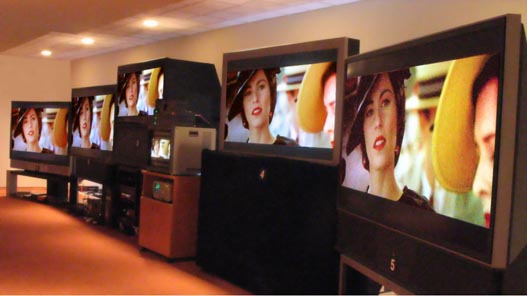
The LCoS Shoot-Out with the lights turned on. Photograph by David Migliori.
LCoS - Liquid Crystal on Silicon - Display Technology Shoot-Out
Four articles analyzing and comparing five Liquid Crystal on Silicon TVs.
LCoS is the latest main-stream display technology,
which is marketed under a variety of names including
JVC's D-ILA and Sony's SXRD.
|
Part A: An Introduction to LCoS Technology
Provides an introduction to LCoS technology and compares the panels
from different manufacturers.
Part B: LCoS Color and Gray-Scale Accuracy
Describes how the TVs were tested,
and then examines the photometry and colorimetry
of all of the TVs in detail,
which provides a quantitative assessment
of their color and gray-scale accuracy.
Part C: Test Pattern and Jury Panel Evaluations
Provides a revealing Test Pattern analysis,
then provides a description of the extensive viewing tests
by a 34 member Jury Panel,
and finishes with individual Assessments for each of the units,
including the Jury grades, evaluations and comments.
Part D: Comparison with CRT, LCD, Plasma and DLP
Provides an overall assessment of LCoS technology,
followed by detailed technical performance comparisons between all of the major
display technologies: CRT, LCD, Plasma, DLP, and LCoS.
It finishes with a discussion of the most exciting new developments in
display technology that will be the subject of future articles in this series.
Sidebar A: LCoS Shoot-Out TV Manufacturers
This sidebar provides information on each TV manufacturer that participated in the Shoot-Out.
Sidebar B: LCoS Shoot-Out Hardware and Software
This sidebar provides information on all of the hardware and software components used for the Shoot-Out.
|
|










