Motorola Droid LCD Display Shoot-Out
Dr. Raymond M. Soneira
President, DisplayMate Technologies Corporation
Copyright © 1990-2010 by DisplayMate
Technologies Corporation. All Rights Reserved.
This article, or any part
thereof, may not be copied, reproduced, mirrored, distributed or incorporated
into any other work without
the prior written permission of DisplayMate Technologies Corporation
Series
Overview
This is part of a
comprehensive article series with in-depth measurements and analysis for the
OLED and LCD displays in the Google
Nexus One, the Apple iPhone 3GS, the Motorola Droid, the Samsung
Galaxy S, and the Apple iPhone 4. We will show you the good, the bad,
and also the ugly unfinished rough edges and problems lurking below the
surface of each of these displays and display technologies, and then
demonstrate how the displays can be improved by using images that have been
mathematically processed to correct color and imaging errors on each
smartphone so you can compare them to the originals. The series begins with
the Google Nexus One and Apple iPhone 3GS. It then continues with higher
performance “Super” displays in the Motorola Droid, the Samsung
Galaxy S, and the Apple iPhone 4. Finally, there is a five way Smartphone "Super" LCD-OLED Display
Technology Shoot-Out
that compares all of the units simultaneously.
|

|
Introduction
A key element in the success of all smartphones and mobile
devices is the quality and performance of their display. There have been
lots of articles comparing various smartphone LCD and OLED displays and
technologies, but almost all simply deliver imprecise off-the-cuff remarks
like “the display is gorgeous” with very little in the way of serious
attempts at objective or accurate display performance evaluations and
comparisons – and many just restate manufacturer claims and provide
inaccurate information, performance evaluations and conclusions. This article objectively
evaluates the display performance of the Motorola Droid IPS LCD display
based on extensive scientific lab measurements together with extensive
side-by-side visual tests.
The
Motorola Droid has a high-performance In Plane Switching IPS LCD display
with a White LED backlight. The screen is 3.7 inches diagonally and has a
high-resolution high-density 854x480 pixel display with a screen Aspect
Ratio of 1.78, which is identical to standard 16:9 widescreen displays,
such as HDTVs, which have an Aspect Ratio of 1.78.
Both the Motorola Droid and
Nexus One use the Google Android OS. The Nexus One was tested with version
2.1 and the Motorola Droid with version 2.0.1. We found so many image and
picture quality problems and implementation issues with the display on the
Nexus One that it will be especially interesting to see whether the
Motorola Droid, which has the same Android OS, suffers from the same
problems and issues, or whether Motorola did a better job of engineering
the display hardware, firmware and software than Google and HTC.
|
|
Important Note for the Android OS 2.1 Upgrade
The
tests for this article were performed using the original 2.0 Android OS for the
Motorola Droid. Afterwards, when the Droid was upgraded to version 2.1, the
Gallery (the principal image viewer for the phone) surprisingly downgraded to
16-bit color from its original full 24-bit color in version 2.0. Fortunately,
version 2.1 of the Android Browser on the Droid still delivers full 24-bit
color. Image Scaling for the Gallery (which processes images so they fit the
native resolution of the display) went from Excellent in version 2.0 to Poor in
version 2.1, the same as for the Browser (both versions). As a result the
beautiful screen shots for the Droid in Figure 1 below now look exactly like
those for the Google Nexus One on the left. Overall, the Droid still delivers
substantially better picture quality and accuracy than the Nexus One.
Presumably these errors, which affect both the Droid and the Nexus One will be
fixed in a future software upgrade, so the Droid will at some point return to
its original excellent 24-bit color and scaling. The quality of the 24-bit
color and scaling for the Nexus One remains to be seen… Google acknowledges
these problems for all 2.1 Android phones including the Nexus One and Motorola
Droid. The next major release of the Android OS will fix these issues and
provide full 24-bit color and improved scaling. Click Here to read
the Google and Cooliris statements commenting on our results.
FIGURE 1
Figure 1. Revealing Screen Shots for
the Google Nexus One and Motorola Droid.
|
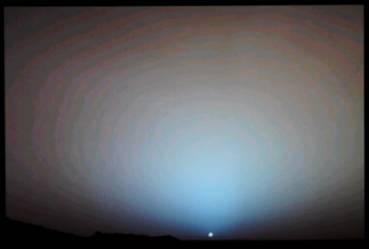
Nexus One: NASA
Photo - Sunset on Mars
Gallery Application:
Lots of false contouring and image noise
|
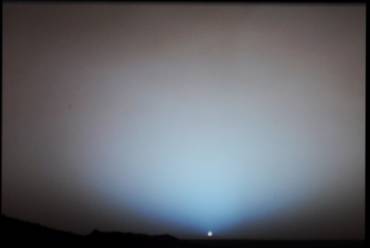
Motorola Droid:
NASA Photo - Sunset on Mars
Gallery Application:
The same as it looks on a studio monitor
|
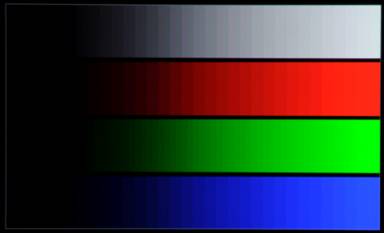
Nexus One: Intensity Scale Ramps
Gallery and Browser
Apps: Coarse steps and tinting on white
|
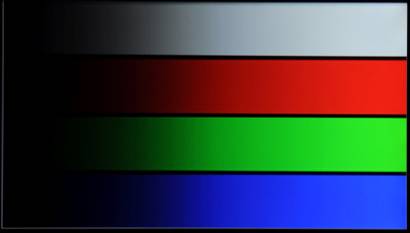
Motorola Droid: Intensity Scale Ramps
Gallery and Browser
Apps: Very smooth and artifact free
|
Figure 1. Revealing Screen Shots for
the Google Nexus One and Motorola Droid.
The test patterns are 24-bit bmp at the native
resolution of each display.
Results and Conclusions
The display was evaluated
by downloading 24-bit native resolution 854x480 test patterns and 24-bit HD
resolution test photos to the phone. Note that we are testing and evaluating
the display on the Droid with whatever hardware, firmware, OS and software are
provided by Motorola.
Color
Depth and Granularity: Excellent Artifact Free 24-bit Color
The Droid provides full
on-screen 24-bit color, which has 256 possible intensity levels for each of the
Red, Green and Blue sub-pixels that are used to mix and produce all of the
on-screen image colors. It’s the same as what is found on most monitors and
HDTVs. When done properly, as on the Droid, it produces a nice color and
intensity scale with few visible artifacts. Figure 1 shows the smooth intensity
scale for both a photograph and test pattern that are visibly free of artifacts
on the Droid.
Display
Image Quality, Colors and Artifacts: Excellent
The image and picture quality on the Droid is excellent
across the board, including text, icons, and menu graphics. In the important
category of images, pictures and photographs from external sources, whether
they be from digital cameras or web content, are rendered quite well. The
calibration is very good and the images and photos are rendered relatively artifact
free, including the critical rescaling function that is needed to fit images
and photos onto the native 854x480 resolution of the display. The image and
picture quality on the Droid is actually better than in most computer monitors
and HDTVs. However, there is a problem with rescaling in the Android Browser on
the Droid, which exhibits the same artifacts as the Nexus One, and will
presumably be fixed in the future.
The Measurements with Explanations and
Interpretations:
The Measurements section
below has details of all of the lab measurements and tests with lots of
additional background information and explanations including the display’s
Maximum Brightness and Peak Luminance, Black Brightness, Contrast Ratio, Screen
Reflectance, Bright Ambient Light Contrast Rating, Dynamic Color and Contrast,
Color Temperature and White Chromaticity, Color Gamut, Intensity Scale and
Gamma, the variation of Brightness, Contrast Ratio and Color Shift with Viewing
Angle, the Power Consumption and Light Spectrum of the display.
The
Viewing Tests: Excellent
We compared the Motorola Droid side-by-side to a
calibrated Professional Sony High Definition Studio Monitor using a large set
of DisplayMate Calibration and Test Photographs. All of the photos on the Droid
were an excellent match, including faces and well known objects such as fruits,
vegetables, flowers, grass, even a Coca-Cola can. The image and picture quality
on the Droid is actually better than in most computer monitors and HDTVs. This
is the result of an excellent factory calibration of the Color Gamut and
Intensity Scales.
Factory
Calibration and Quality Control: Very Good
The overall factory calibration and quality control for
the Motorola Droid display are very good. The accuracy of the white point and
color and gray-scale tracking are all very good, which means that the Red,
Green and Blue primaries have been carefully calibrated and balanced. The
images are relatively free of objectionable artifacts.
Suggestions
for Motorola:
Keep up the good work… To make your displays even better
follow the detailed comments and recommendations above and in greater detail
below. Also ask Google to fix the poor image rescaling and its 16-bit
implementation in the Browser and possibly other Android OS applications.
This
article is a lite version of our intensive scientific analysis of smartphone
and mobile displays – before the benefits of our advanced mathematical DisplayMate Display Optimization
Technology, which can correct or improve many of the deficiencies –
including higher calibrated brightness, power efficiency, effective screen
contrast, picture quality and color and gray scale accuracy under both bright
and dim ambient light, and much more. If you are a
manufacturer and want our expertise and technology to turn your display into a
spectacular one to surpass your competition then Contact DisplayMate Technologies
to learn more.
Motorola Droid
Conclusion: Excellent Mobile Display
wins Best Mobile Picture
Quality Award
 The Motorola
Droid is an excellent mobile display with just a few comparatively minor
shortcomings. In terms of image and picture quality it comes closer to a high
quality computer monitor or HDTV than any other mobile display we have tested –
all the more impressive because mobile displays operate under challenging size,
power and cost constraints. In fact, the image and picture quality and accuracy
on the Droid is actually better than in most computer monitors and HDTVs (but
smaller, of course). The screen is very bright and very sharp, has excellent
color and gray scale accuracy, and has very good Contrast and readability under
both dim and bright ambient light. For these reasons we have awarded the
Motorola Droid the Best
Mobile Picture Quality Award in the DisplayMate Best Video Hardware
Guide.
The Motorola
Droid is an excellent mobile display with just a few comparatively minor
shortcomings. In terms of image and picture quality it comes closer to a high
quality computer monitor or HDTV than any other mobile display we have tested –
all the more impressive because mobile displays operate under challenging size,
power and cost constraints. In fact, the image and picture quality and accuracy
on the Droid is actually better than in most computer monitors and HDTVs (but
smaller, of course). The screen is very bright and very sharp, has excellent
color and gray scale accuracy, and has very good Contrast and readability under
both dim and bright ambient light. For these reasons we have awarded the
Motorola Droid the Best
Mobile Picture Quality Award in the DisplayMate Best Video Hardware
Guide.
The Measurements with Explanations and Interpretations
This
section explains all of the measurements incorporated in the article. The
display was evaluated by downloading 24-bit native resolution 854x480 test
patterns and 24-bit HD resolution test photos to the Motorola Droid. Note that
we are testing and evaluating the display on the Droid with whatever hardware,
firmware, OS and software are provided by Motorola. All measurements were made
using DisplayMate Multimedia
Edition for Mobile Displays to generate the analytical test patterns
together with a Konica
Minolta CS-200 ChromaMeter, which is a Spectroradiometer. All measurements
were made in a perfectly dark lab to avoid light contamination. All devices
were tested with their Backlight set for maximum brightness with the Automatic
Brightness light sensor control turned off, and running on their AC power
adapter with a fully charged battery, so that the battery performance and state
was not a factor in the results. For further in-depth discussions and
explanations of the tests, measurements, and their interpretation refer to
earlier articles in the DisplayMate
Multimedia Display Technology Shoot-Out article series and the DisplayMate Mobile Display
Shoot-Out article series.
Konica Minolta CS-200
1. Peak Brightness: 449 cd/m2 –
Excellent brightness for a Mobile Display
This is the maximum brightness that the display
can produce, called the Peak White Luminance. 449 cd/m2 is about as
bright as you’ll find on any current mobile display. It’s fine for just about
everything except direct sunlight, although it may be too bright for
comfortable viewing under dim ambient lighting. If you find that to be the
case, turn on the Droid’s Automatic Brightness, which uses a light sensor to
adjust the Peak Brightness settings. Since that can be used to decrease the
power used by the backlight it will also increase the battery run time.
2. Black Level Brightness: 0.165 cd/m2
– Good for a Mobile Display
The Black Level is the
closest approximation to true black that the display can produce. Almost all
displays wind up producing a visible dark gray on-screen instead of true black.
This is a major problem for LCDs. The glow reduces image contrast and screen
readability and can be distracting or even annoying in dark environments. It
ruins the dark end of the display’s intensity/gray scale and washes out colors
in the image. But note that in bright ambient lighting the Black Level is
irrelevant because reflections off the screen dominate the screen background
brightness. The Droid’s value of 0.165 cd/m2 is very dark for a
mobile display in typical ambient lighting. Note that if you decrease the
screen Brightness with the (Backlight) Brightness Control, the Black Brightness
will also decrease proportionally by the same amount, so in dimmer ambient
lighting the Black Brightness can be reduced significantly if desired.
3. Contrast Ratio – Only Relevant for Low
Ambient Light:
1,436 –
Good for Mobile – Dynamic Contrast is 2,721
The Contrast Ratio is a
measure of the full range of brightness that the display is capable of
producing. It is the ratio of Peak Brightness to Black Level Brightness. The
larger the Contrast Ratio the better, but it is only relevant for low ambient
lighting because reflections off the screen dominate the display’s Black Level
in bright ambient lighting. The very best LCDs now have (true) Contrast Ratios
of 1,500 to 2,000 so the 1,436 value for the Droid is very impressive in a
mobile device. Don’t confuse the true Contrast Ratio with the tremendously
inflated values that are published by many manufacturers. Because the Droid
uses Dynamic Contrast (see below) the Contrast Ratio from the brightness values
in 1 and 2 above is a Dynamic Contrast Ratio, and it’s 2,721. The static or
true Contrast Ratio for the Droid is 1,436, which is measured at low APL where
the Dynamic Contrast has a constant value (see below).
4. Screen Reflectance of Ambient Light: 12.1 Percent – Average
The often overlooked
Screen Reflectance is actually the most important parameter for a mobile
display, even more important than Peak Brightness. The screen reflects a
certain percentage of the surrounding ambient light, which adds to the screen
background, washes out the image, and makes it harder to see what is on the
screen. In high ambient lighting the Screen Reflectance can significantly
reduce the visibility and readability of screen content. The lower the Screen
Reflectance the better. The value for the Droid of 12.1 percent is in the
middle of the range of values we’ve measured for mobile devices. Lowering the
Screen Reflectance increases the cost of a display, but it’s the easiest and
best way to improve screen readability under bright ambient light. The Screen
Reflectance measurements were done in accordance with VESA FPDM 308-1,
Reflectance with Diffuse Illumination, using an integrating hemispherical dome
and a calibrated diffuse white reflectance standard.
5. High Ambient Light Contrast Rating: 37 – Very Good
In the same way that the
Contrast Ratio measures the screen contrast under low ambient lighting, the
Bright Contrast Rating specifies the relative screen contrast under high
ambient lighting. It is the ratio of Peak Brightness to Screen Reflectance. The
higher the value the better you’ll be able to see what’s on the screen when you
are in a bright location. 37 is relatively high, so the Droid is among the best
mobile displays for high ambient lighting. For all mobile devices the High
Ambient Light Contrast Rating is much more important than the Contrast Ratio.
6. Dynamic Color and Dynamic Contrast: Yes – But for Reducing
Power Consumption
Some displays dynamically adjust the color, gray
scale and contrast on every image that is displayed using an internal automatic
image processing algorithm. The goal is generally to jazz up and “enhance” the
picture by stretching and exaggerating the colors and intensity scale. It is
similar to the Vivid mode found in many digital cameras and HDTVs. Since it
alters and frequently distorts the image it is better left as an option for
people who aren’t concerned with picture accuracy and fidelity. Since the
Dynamic modes are generally triggered by changes in Average Picture Level, a
very simple test for Dynamic Contrast is to separately measure the brightness
of full screen Red, Green and Blue images and then compare them to White, which
should equal their sum. If they don’t agree then there is Dynamic Color and
Contrast processing. For the Droid, the measured Luminance for Red=53,
Green=275 and Blue=19 cd/m2. Their sum is 347 cd/m2,
which is 23 percent lower than the measured value for White, 449 cd/m2,
so the Droid uses a moderate amount of Dynamic Color and Contrast. In fact, at
low APL the peak luminance decreases to 237 cd/m2 as a result of
dimming the LCD backlight, suggesting that the actual goal is to reduce power
consumption, rather than image “enhancement.” Still we recommend that Dynamic
processing be an option that the user can turn on and off.
7. Color Temperature and Chromaticity: 6752 degrees Kelvin –
Very Close to D6500, Excellent
White is not a single
color but rather falls within a range that is normally specified by a Color
Temperature. For accurate color reproduction of most content, including
photographs, images and web content it needs to be set to the industry standard
D6500, which is how most professional photo and video content is color
balanced. D6500 is the color of natural daylight and is similar to a Black Body
at 6500 degrees Kelvin. The Droid’s White Point is actually very close to D6500
– see the White Points in Figure 2 below. The measured CIE Chromaticity
Coordinates of the White Point are u’=0.1946 v’=0.4680.
8. Color Gamut: Excellent Match to the sRGB / Rec.709
Standard
The Color Gamut of a
display is the range and set of colors that it can produce. The only way that a
display will deliver good color and gray scale accuracy is if it is accurately
calibrated to an industry standard specification, which for computers, digital
cameras, and HDTVs is sRGB or Rec.709. It’s the standard for most content and
necessary for accurate color reproduction. If the Color Gamut is smaller than
the standard then the image colors will appear too weak and under-saturated. If
the Color Gamut is greater than the standard then the image colors will appear
too strong and over-saturated. The important point here is that a Color Gamut
larger than the standard is also bad, not better. Wider gamuts will not show
you any colors or content that are not in the original images, which are almost
always color balanced for the sRGB / Rec.709 standard. Wider color gamuts
simply distort and decrease color accuracy and should be avoided, except for
some special applications.
Figure 2 shows the
measured Color Gamut for the Nexus One and the Motorola Droid alongside the
Standard sRGB / Rec.709 Color Gamut in a CIE 1976 Uniform Chromaticity Diagram.
The dots in the center are the measured White Points for the phones along with
the D6500 Standard, which is marked as a white circle. The outermost curve are
the pure spectral colors and the diagonal line on the bottom right is the line
of purples. A given display can only reproduce the colors that lie inside of
the triangle formed by its primary colors. Highly saturated colors seldom occur
in nature so the colors that are outside of the standard sRGB / Rec.709
triangle are seldom needed and are unlikely to be noticed or missed in the
overwhelming majority of real images. When a camera or display can’t reproduce
a given color it simply produces the closest most saturated color that it can.
FIGURE 2
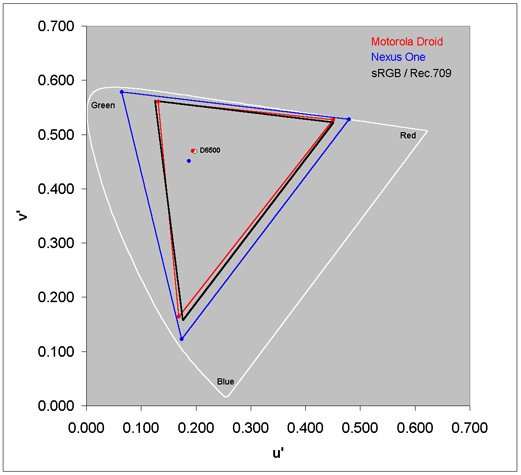
Figure 2. CIE 1976 Uniform
Chromaticity Diagram showing the Color Gamut and White Points for the Nexus One
and Motorola Droid
The Droid produces an excellent match to the standard
Color Gamut, which is the black triangle in Figure 2, while the Nexus One has
much too large a color Gamut. As a result the Droid produces images with an
excellent color balance while the Nexus One produces images that have
significantly too much color saturation. This applies to all external content
viewed on the displays, including web content, such as images, photos and
videos. This was easy to see in the viewing tests where we compared the
displays side-by-side to a calibrated Professional Sony High Definition Studio
Monitor using a large set of DisplayMate Calibration and Test Photographs. All
of the photos on the Droid were an excellent match, including faces and well
known objects such as fruits, vegetables, flowers, grass, even a Coca-Cola can,
while the Nexus One photos had way too much color, to the point of appearing
gaudy.
9. Intensity Scale, Image Contrast and Gamma: Very Good Match to the
Standard
The display’s intensity
scale not only controls the contrast within an image but it also controls how
the Red, Green and Blue primary colors mix to produce all of the on-screen
colors. So if it doesn’t obey the industry standard intensity scale then the
colors and intensities will be wrong everywhere on-screen because virtually all
professional content and all digital cameras use the sRGB / Rec.709 standard,
so it’s necessary for accurate image, picture and color reproduction. The
standard intensity scale is not linear but rather follows a mathematical
power-law, so it is a straight line on a log-log graph. Its slope is called
Gamma, which is 2.2 in the standards. In order to deliver accurate color and
intensity scales a display must closely match the standard. Figure 3 shows the
measured (Transfer Function) Intensity Scale for the Motorola Droid and Nexus
One alongside the industry standard Gamma of 2.2, which is a straight line.
FIGURE 3
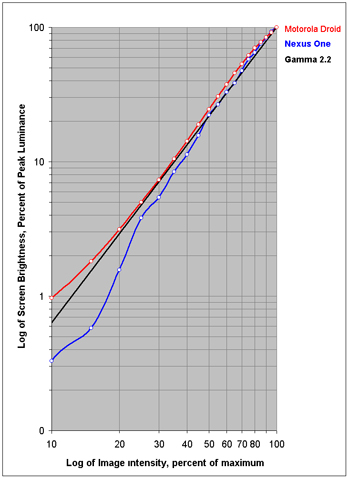
Figure 3. Intensity Scale for the
Nexus One and Motorola Droid
The Droid provides a very good match with respect to the
standard intensity scale, which is needed in order to accurately reproduce
images and pictures for most content. It’s actually better than most HDTVs and
computer monitors. Gamma is the slope of the intensity scale, which should be a
constant 2.2 like the straight line in Figure 3. In the central 20 to 80
percent signal range the Gamma for the Droid is 2.24, which is an excellent
match to the standard.
10. Brightness Decrease with Viewing Angle: 64 percent Decrease in
30 degrees – Bad, Very Large
A major problem with many displays, especially
LCDs, is that the image changes with the viewing angle, sometimes dramatically.
The Peak Brightness, Black Luminance, Contrast Ratio and color generally change
with viewing angle (see below). Some display technologies are much better than
others. At a moderate 30 degree viewing angle the Peak Brightness of the Droid
fell by 64 percent to 160 cd/m2, which is an incredibly large
decrease. This behavior is typical for LCDs.
11. Black Level and Contrast Ratio Shift with
Viewing Angle: Bad, Very Large
At a moderate 30 degree viewing angle the Black
Level Brightness increased by 88 percent to 0.31 cd/m2, the
Contrast Ratio fell to 280 and the Dynamic Contrast to 516. This behavior is
typical for LCDs.
12. Color Shift with Viewing Angle: Excellent, no Visible
Shift
Colors generally shift
with viewing angle whenever the brightness shifts with viewing angle because
the Red, Green and Blue sub-pixels each shift independently and vary with
intensity level. At a moderate 30 degree viewing angle Red shifted the most, by
Δ(u’v’) = 0.0020, which is ½ times the Just Noticeable Color Difference.
Green also by Δ(u’v’) = 0.0020 and Blue shifted the least by 0.0016. These
values are so low that the Motorola Droid shows no visible color shift with
angle.
13. RGB Display Power Consumption: Good, Relatively Low
The power consumed by LCD
displays is independent of the brightness and color distribution of the images
– it only depends on the Brightness setting of the backlight that illuminates
the LCD from behind. Dynamic Contrast and the Ambient Light Sensor both modify
the manual user backlight brightness setting. The Automatic Brightness option
allows the ambient light sensor on the Motorola Droid to adjust the backlight
brightness and power setting as the ambient light changes. This not only
improves visual comfort but can also increase the battery run time. We turned
off Automatic Brightness for the tests but Dynamic Contrast is fully automatic
and cannot be disabled so the power varies with the Average Picture Level,
falling to a low as 53 percent of Maximum for the lowest APLs. It is possible
to indirectly determine the power used by the display by measuring the AC power
used by the Droid with different backlight settings. The average power used
when the display is dark in standby mode is used as the baseline and is
subtracted from the power measured for the other states.
Table 1 lists the Measured
Relative Power, the Measured Luminance, and the Relative Luminous Efficiency,
which is just the Measured Luminance divided by the Measured Relative Power,
and normalized to 1.0 for White, which has the highest total efficiency.
Table 1. Motorola Droid
LCD Display Power Consumption
|
Maximum Backlight
Full Screen
|
Black
|
Peak Red
|
Peak Green
|
Peak Blue
|
Peak White
|
|
Measured Relative Power
|
0.46 watts
|
0.54 watts
|
0.73 watts
|
0.48 watts
|
0.87 watts
|
|
Measured Luminance
|
0.165 cd/m2
|
53 cd/m2
|
275 cd/m2
|
19 cd/m2
|
449 cd/m2
|
|
Relative Luminous Efficiency
|
0.0007
|
0.19
|
0.73
|
0.08
|
1.00
|
14. OLED and LCD Spectra: Very Interesting
The spectra of an LCD display is just the
spectrum of the backlight filtered through the individual Red, Green and Blue
sub-pixel filters within the panel. OLEDs are emissive devices so the spectra
of the Nexus One is just the sum of the individual Red, Green and Blue OLED
spectra, modified slightly by the touchscreen layer and anti-reflection
absorption layer through which their light must pass. We thought it would be
very useful and interesting to compare the spectra of the Nexus One with the
spectra of the Motorola Droid, so we asked Konica Minolta to
loan us their flagship CS-2000
Spectroradiometer to perform the measurements. The spectra for White, which
is the sum of the Red, Green and Blue primaries is shown in Figure 4 for both
the Nexus One and Motorola Droid.
FIGURE 4
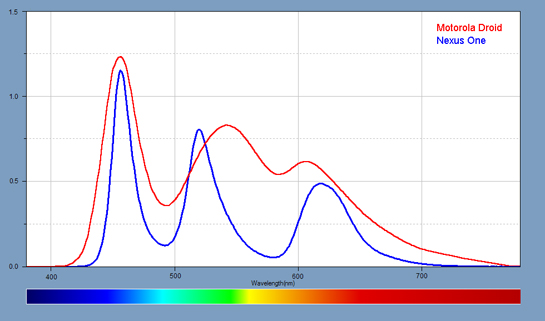
Figure 4. RGB Spectra for the Nexus
One and Motorola Droid
As
expected the OLED RGB spectra are relatively narrow because of their high color
saturation. The Motorola Droid LCD RGB spectra is a filtered broadband
spectrum. The backlight for the Droid is a white LED, which consists of a Blue
LED with a yellow phosphor.
Special Thanks to Jay Catral of Konica
Minolta for visiting our Lab and bringing the CS-2000
Spectroradiometer to measure the Spectra and the very dark Black Luminance
of the Nexus One. And Special Thanks to Konica Minolta Sensing
for loaning us the CS-2000 and sending Jay Catral.
About the Author
Dr. Raymond Soneira is
President of DisplayMate Technologies Corporation of Amherst, New Hampshire,
which produces video calibration, evaluation, and diagnostic products for
consumers, technicians, and manufacturers. See www.displaymate.com. He is a research
scientist with a career that spans physics, computer science, and television
system design. Dr. Soneira obtained his Ph.D. in Theoretical Physics from
Princeton University, spent 5 years as a Long-Term Member of the world famous
Institute for Advanced Study in Princeton, another 5 years as a Principal
Investigator in the Computer Systems Research Laboratory at AT&T Bell
Laboratories, and has also designed, tested, and installed color television
broadcast equipment for the CBS Television Network Engineering and Development
Department. He has authored over 35 research articles in scientific journals in
physics and computer science, including Scientific American. If you have any
comments or questions about the article, you can contact him at dtso.info@displaymate.com.
About DisplayMate Technologies
DisplayMate Technologies specializes in
advanced mathematical display technology optimizations and precision analytical
scientific display diagnostics and calibrations to deliver outstanding image
and picture quality and accuracy – while increasing the effective visual
Contrast Ratio of the display and producing a higher calibrated brightness than
is achievable with traditional calibration methods. This also decreases display
power requirements and increases the battery run time in mobile displays. This article is a lite version of
our intensive scientific analysis of smartphone and mobile displays – before
the benefits of our advanced mathematical DisplayMate Display Optimization
Technology, which can correct or improve many of the deficiencies –
including higher calibrated brightness, power efficiency, effective screen
contrast, picture quality and color and gray scale accuracy under both bright
and dim ambient light, and much more. Our advanced
scientific optimizations can make lower cost panels look as good or better than
more expensive higher performance displays. For more information on our
technology see the Summary description of our Adaptive Variable Metric Display
Optimizer AVDO. If you are a display or product
manufacturer and want our expertise and technology to turn your display into a
spectacular one to surpass your competition then Contact DisplayMate Technologies
to learn more.
Article Links: Display Technology Shoot-Out
Article Series Overview and Home Page
Copyright © 1990-2010 by DisplayMate
Technologies Corporation. All Rights Reserved.
This article, or any part
thereof, may not be copied, reproduced, mirrored, distributed or incorporated
into any other work without
the prior written permission of DisplayMate Technologies Corporation











